
Subtitle: From 0 to Indexed. An Ongoing SEO Experiment for Independent Creators
1. Introduction
In the previous article, I argued that a “new form of craftsmanship” must include more than philosophy. It must also solve the problem of survival. You can’t separate meaning from making a living. Last time, I focused on values and production.
- Critique of Matthew Crawford — Why romanticizing manual labor fails in the age of AI]
- Why Small Business, Creators Must Hack Systems, Not Perfect Skills]
In this article, I want to focus on distribution, especially platforms. This piece is written for people who are suffering because their content does not appear on Google at all. This article was written with light content regarding practical SEO tips and platform usage experiences.
2. Why You Must Understand Platform Distribution
Here is the core question of this article:
“Why do skilled creators still fail online, even if their work is good?”
Answer: If you don’t understand platforms, algorithms, and domain structures, there is no road. In this article, I will talk about the mistakes you are likely to make when you build your own website as a small business owner or creator.
In the past, craftsmen only had to make good products. That world is gone. In the 21st century, even if you bake amazing bread or write brilliant articles, no one will come if there is no road to your shop.
When my sitemap broke and Google bots stopped reading my posts, I realized something simple and brutal: If you don’t understand the algorithm that opens your store’s door, your products will rot in the showcase forever. Today, a craftsman’s shop must become a ship sailing through the ocean of algorithms. That’s why I started by studying the difference between: rented platform stores, and independent websites.
My conclusion was simple. I chose WordPress with an independent domain.
3. Building a Store on Big Platforms
Why do people willingly pay rent to large platforms and build their stores there?
(1) Pros: Almost Zero Entry Barriers
First, low technical difficulty.
If you sell through Amazon, Naver, TikTok Shop, Instagram, or YouTube Shop, you don’t face serious technical confusion. But with an independent domain, the biggest problem is this: when traffic is zero, you don’t know what is wrong.
You are not a big company. You can’t hire a full-time webmaster. Even if you ask AI, you still need to ask the right questions. If you do nothing, no one tells you what’s broken. Freelance developers won’t take full responsibility either. They are not permanent partners. On big platforms, this problem disappears. You just upload products.
Second, massive traffic and easier marketing.
Big platforms already have crowds. So you are more likely to get views and sales. They also handle search optimization inside the platform. Independent domains get none of that. You must do everything yourself. I even know someone who ran a clothing store and used Instagram dance videos of hot girl to attract traffic and redirect people to his own site. (The business failed.)
Third, payment systems are easy.
I once tried to connect Stripe payments to my WordPress site. After 4–5 hours of work, I finally built a payment page. As it turns out, Stripe has not entered the South Korean market due to strict government regulations. In any case, onboarding onto a major platform provides various conveniences when it comes to payments and settlements. Payment systems are ready, trusted, and optimized for UX. You don’t need to think about it.
(2) Cons: No Loyalty, Price Wars, No Brand
So, what are the downsides? Platform stores are easily dragged into dopamine-driven competition: new items, lowest price, constant promotions.
First, it is hard to build loyal customers.
In my Toyota Pub series, I kept saying this: Don’t chase new customers with dopamine marketing. Focus on people who already visited once. Make them stay because they feel comfortable. But platform stores cannot fully own customer data. You must constantly hunt new buyers. That means your content is forced into: dopamine competition, higher marketing costs. If it’s not new, hot, and stimulating, the algorithm ignores you. Production costs go up. But unless you hit big sales, you lose money. Even if one product explodes, when sales are concentrated in only a few items, overall cost management becomes unstable. That destroys capital efficiency (ROI).
Second, brutal price competition.
Price wars are what kill small businesses. Once you compete on price, large companies and distributors enter your category. Algorithms rank cheaper products higher, even if the difference is just one cent. Furthermore, the commission fees charged by these platforms are downright extortionate. For instance, Musinsa, South Korea’s leading fashion platform, takes a staggering 30% of the sale price as its commission. To secure top visibility on the platform, sellers are pressured to lower their prices, yet they are simultaneously burdened by these exorbitant fees. Small sellers cannot survive that. So you sell more, but keep almost nothing. Platform algorithms turn your store into just one shelf inside a digital dollar store. If someone sells it cheaper next to you, your product goes straight to the warehouse. That is the real rent of platforms.
Third, brand differentiation is extremely difficult.
Since it is difficult to feel anything special through physical mise-en-scène online, brands and logos have become increasingly important. However, giant platforms do not like individual brands standing out. This is because they tend to prioritize their own private label (PB) content or products from affiliated suppliers. Writing is no different; even on Medium, your work gets significant exposure only when it is endorsed by a major publication (PUB). They even go so far as to demand that the original work be attributed to their own intellectual property.
This is bad for small business owners, independent researchers. Because customers don’t remember buying from SaltnFire(Brand). They remember buying from Amazon or Medium. You already can’t fully manage customer data. Now they don’t even remember your store. That is a fatal problem.
(3) Who Actually Wins on Platforms?
In reality, platform marketplaces gather: companies that cannot manage independent sites, and small sellers and creators. But to win there, you need all of this:
- products that don’t require loyalty
- massive daily demand
- strong price competitiveness through bulk purchasing
- budget for promotions and ads (algorithm favor this)
So the winners are those who:
- sell products big companies don’t sell directly,
- offer the lowest price,
- constantly source new items, and
- can afford continuous marketing.
Content creators are not that different. The format is different, but the structure is the same.
(4) Table: Where Should You Open Your Store?
| Category | Platform-Based Store (Amazon, Naver Smart Store, etc.) | Independent Store (WordPress, Shopify, etc.) |
|---|---|---|
| Metaphor | A shop inside a department store (huge foot traffic) | A small shop in a side street (customers must seek you out) |
| Pros | Easy to set up, customers come immediately | No platform fees, full control over loyal customers |
| Cons | High “rent” (fees), brutal price competition | No traffic at first, must learn SEO and site management |
| Best for | Sellers who want to compete with volume and fast turnover | Owners with a strong brand philosophy and long-term vision |
4. Choosing an Independent Store
From the perspective of someone who sells writing as a product, I chose an independent website instead of large platforms like Substack or Medium. That decision caused serious problems with traffic and SEO. This section is about those problems. An independent store is like a shop in a small side street. Customers do not pass by naturally. They only come if the technical structure is built correctly.
Most independent stores are built on platforms like: WordPress, Shopify. In the early stage of business, payment systems and transaction fees are not the main problem. The real problems are these two.
(1) There Is No Easy Way to Get Traffic
Unless you are already famous through: mainstream media, or TV, or major institutions, or viral social media fame, your independent website has almost no brand power. So attracting traffic is extremely difficult. The fastest method is usually aggressive attention grabbing: provocative dance videos, celebrity call-out videos, selling success courses. But let’s be honest. These methods are not sustainable. The real solution is simple but painful: You must consistently produce competitive content or products and build a long-term archive.
But very few people survive this long process. So in the short term, the minimum survival goal becomes: “At least appear in Google search results.”
(2) Many Independent Sites Get Labeled as Low-Quality by Google (Skip, If you are not a WordPress user)
Symptoms of a Low-Quality Domain
I cannot speak for Shopify because I have not used it. So I will focus on WordPress. My blog does not appear on Google at all right now. It has been online for more than 9 months.

[Photo: Zero Appearance on Google , Search Result of “Site:yourdomain.com”]
Why? Before your content can appear in search results, it must be indexed by Google. But in many cases, indexing simply does not happen. In my case, things were fine at first.
- Posts were indexed within seconds.
- Search exposure existed.
- Traffic was coming in.
Then suddenly, everything disappeared. This usually means your domain has been classified as low quality.
Typical Signs of a Low-Quality Site
- Google crawls far more pages than the number of real posts.
- When you search
site:yourdomain.com, you see a chaotic mix of:- tag pages
- category pages
- archive pages
- actual posts
In this situation, empty list pages often rank higher than real content.
Over time, Google lowers your domain score and may stop indexing altogether.
- When you search
site:yourdomain.com, no posts appear at all. Everything has been de-indexed.
Remember: If your site is healthy, you should mostly see only actual posts.
Cause #1: Multiple URL Structures
WordPress automatically generates many URLs for one piece of content. If you do not control this structure, search engines will crawl unnecessary pages. That is why SEO plugins like Yoast SEO > Setting provide options to block:
- tag pages
- author archives
- date archives
- Format archives
- Media pages
In most cases, all of these should be set to noindex. These are duplicate pages, making your domain a cluttered site with thin content. I Checked ‘Search appearance’ option 👉 Disabled.
But I allow category indexing to serve as a structural roadmap for Googlebot. Category pages are technically thin content, but given the simplicity of my site structure, I thought indexing them wouldn’t meaningfully contribute to any low-quality signals.
Let’s see.

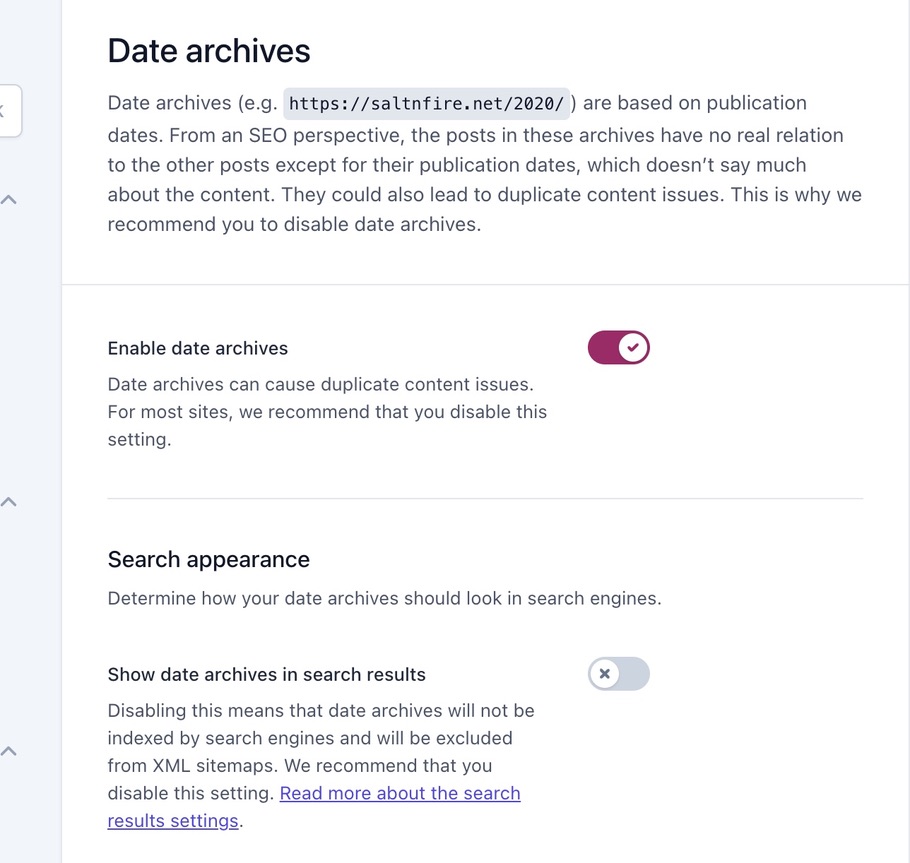
[Photo: Yoast SEO Settings > I set every duplicate page to “noindex”. Search Appearance disabled]
I discovered this problem around October and fixed my sitemap structure and robots.txt file. I have been cleaning my domain for three months. You can also speed up recovery by manually removing pages in:
Search Console → Removals →
https://yourdomain.com/tag/
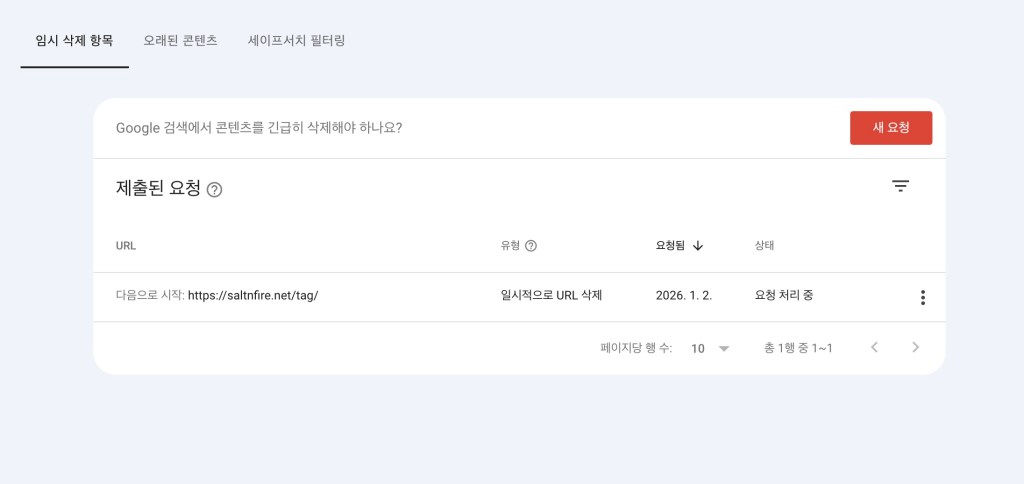
[Photo: Search Console Removal page, Written in Korean. It said ‘request complete’]
My Cleanup Results (Google Search Console)
The number of pages that Google decided to crawl but not index has decreased.
- Oct 20: I fixed sitemap structure
- Dec 23: from 800 low-quality pages down to 285 (real posts: about 160)
- Jan 21: down to 269 (real posts: 172)
- Jan 25: dropped to 75 (real posts: 173)
- June 15: Since resubmitting the sitemap, the number of pages initially surged back up to 200, but has since been steadily decreasing by 1 to 3 pages at a time, dropping to 90 pages as of June 15th (real posts: 197). Meanwhile, the index count still remains at 1 (the root domain).
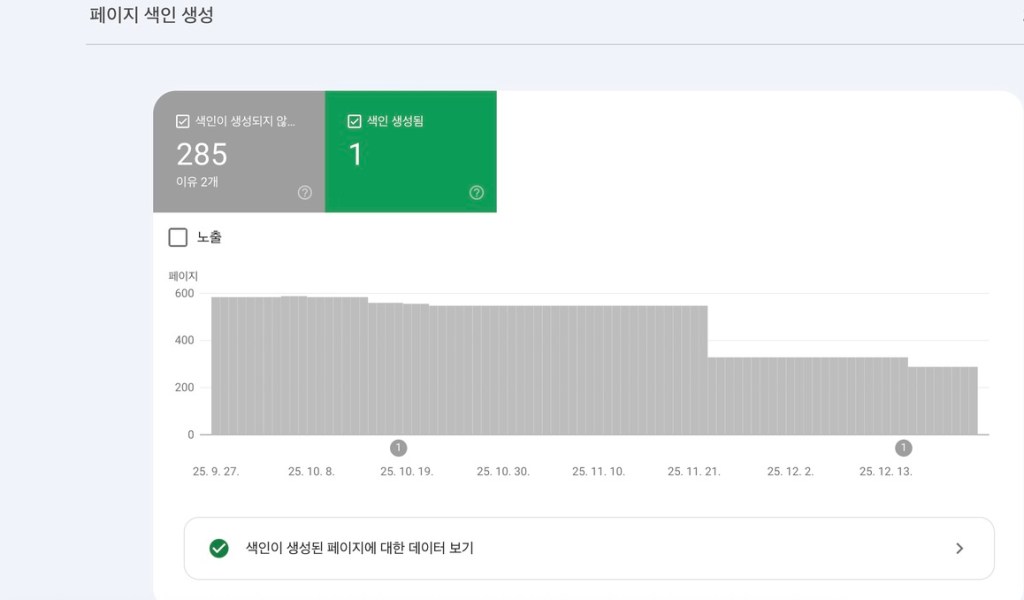
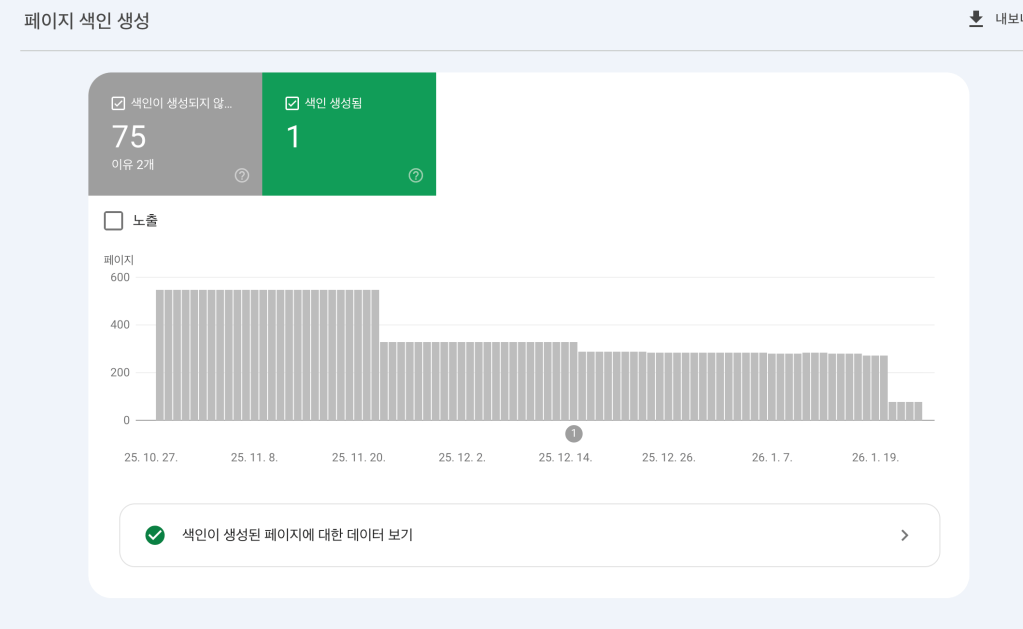
[Photo: After three months of restructuring website, I saw a significant reduction in low-quality pages]
Now I am waiting to see what happens next. (I will continue updating this case.)
If
site:yourdomain.comshows many pages other than posts, suspect multiple URL problems and fix them immediately.
Finally, the First Indexing (07/16/2026)
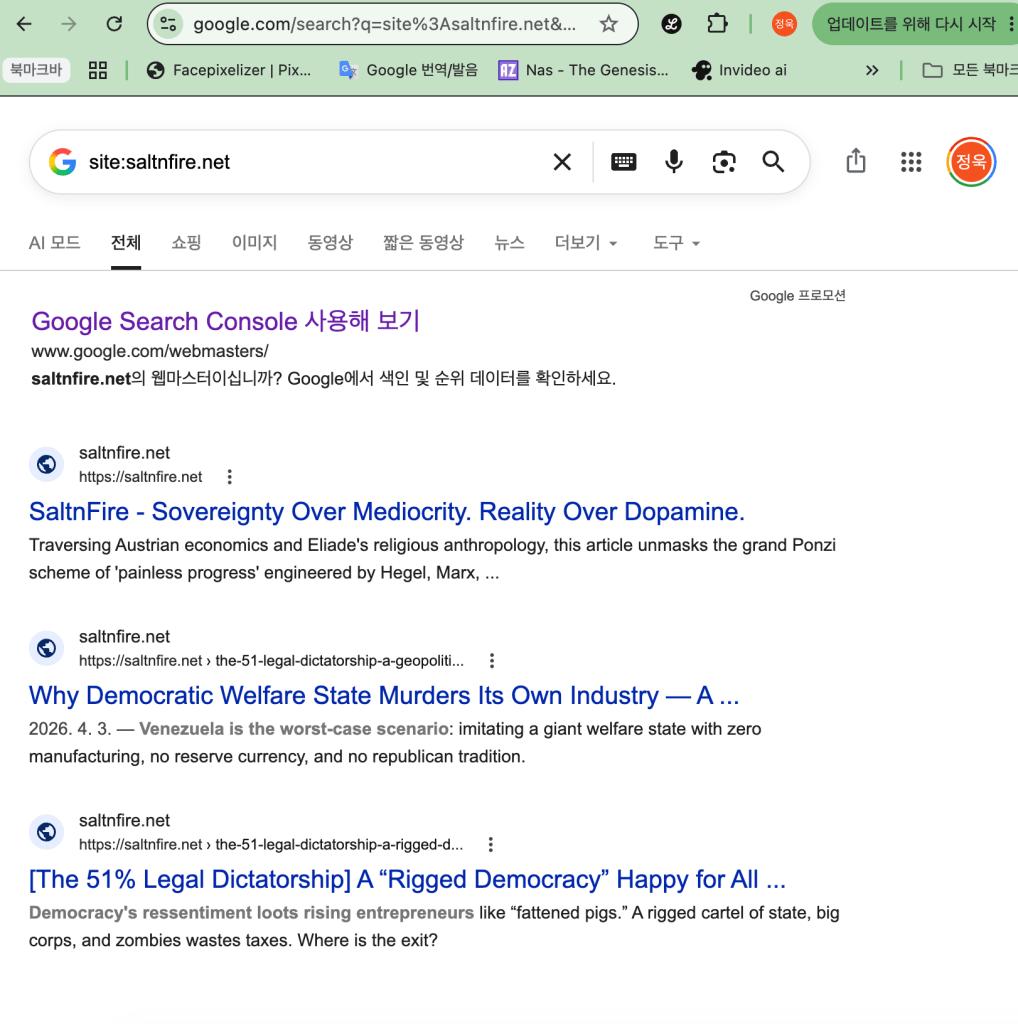

As promised to my readers, I am sharing a report on the results of the technical improvements made to my penalized, low-quality blog. Around July 2025, the blog was flagged, and all indexings were completely wiped out. I restructured the blog’s architecture on October 20 of the same year, and finally, on July 16, 2026, the first indexing has commenced.
First, as shown in the first screenshot, running a site:saltfire.net query now yields two additional posts. Previously, nothing appeared. The second screenshot shows the crawl stats from Google Search Console; under “By Purpose,” you can see that “Discovery” has been newly added. Throughout the year-long penalization period, “Discovery” had never appeared even once.

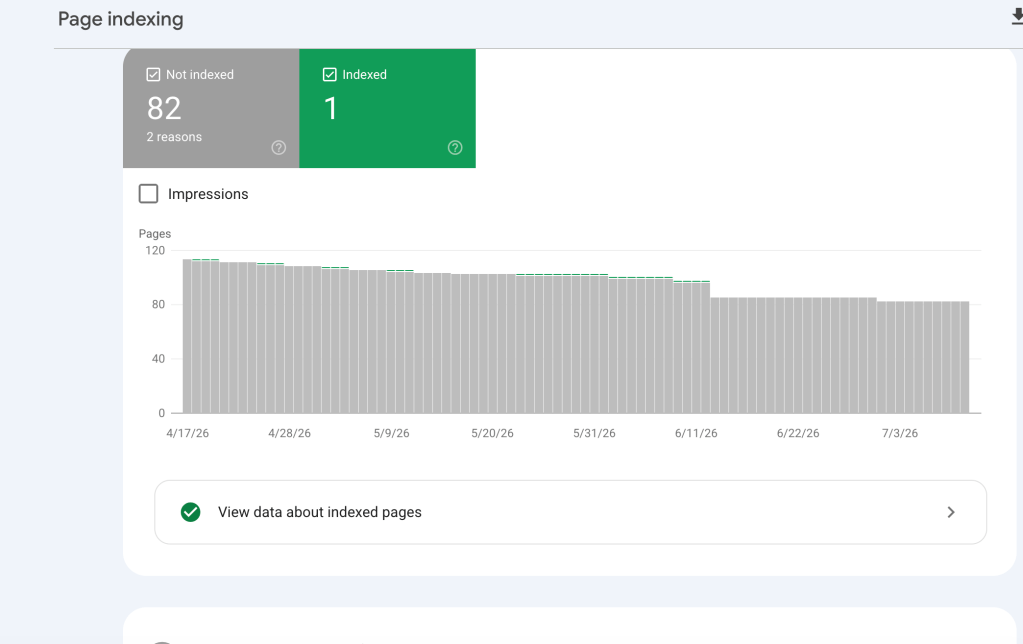
The signs of change began to surface when the HTML crawl statistics rose, and the “Crawled – currently not indexed” metrics steadily decreased. As you can see in the graph, HTML crawling, which had constantly crawled along the bottom at 0 to 10, suddenly exploded to 30. The number of crawled posts has jumped to over 10. Concurrently, the “Crawled – currently not indexed” count steadily dropped by 2 to 3 at a time, indicating that low-quality pages were being automatically cleared out of the system.
I will provide another update as more visible changes and progress unfold.
the Second Indexing (07/28/2026)

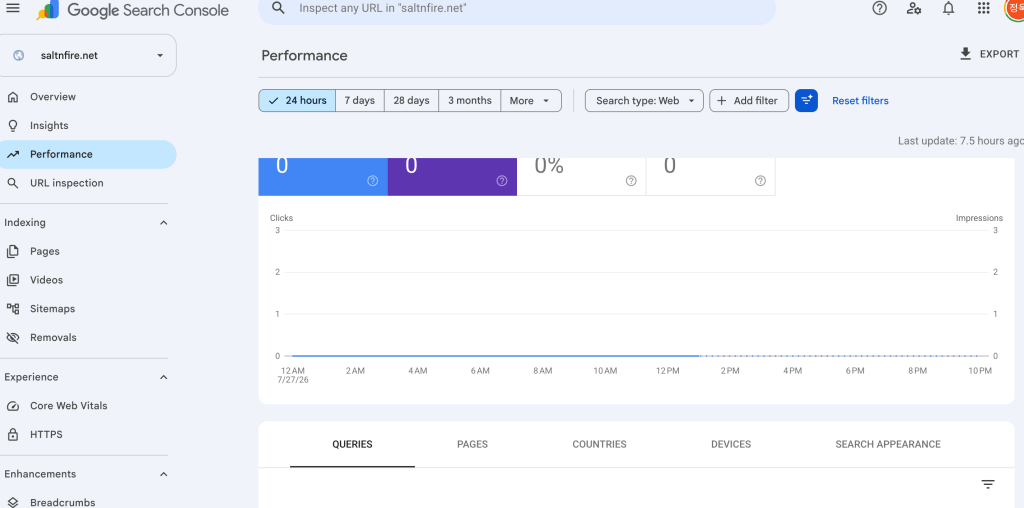
After waiting for a long time, the number of indexed pages has finally increased to 29. However, impressions have not started yet. Upon looking into this, I found out that when a blog recovers from a low-quality status, it goes through a testing phase for exposure, much like a brand-new domain. For now, I am quite satisfied even with this level of progress. The rest will be resolved with consistent work and time.
Cause #2: Incorrect Canonical Settings
If you publish the same content on multiple platforms, you must set canonical URLs correctly. Canonical tells Google: “This is the original source.” If canonical is not set, Google indexes the version with higher domain authority. But In my case, even with canonical settings, Google kept indexing Medium instead of my blog.
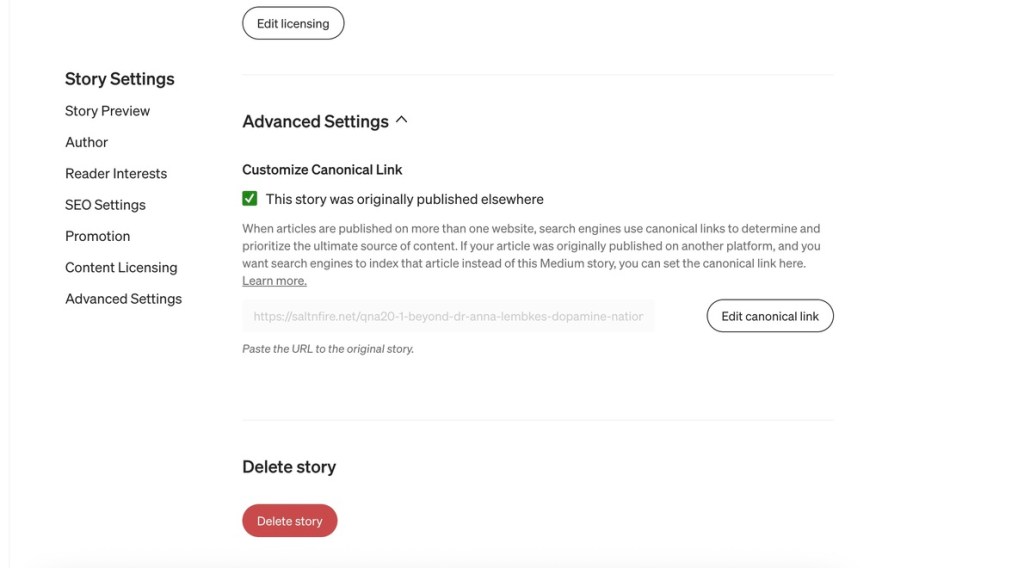
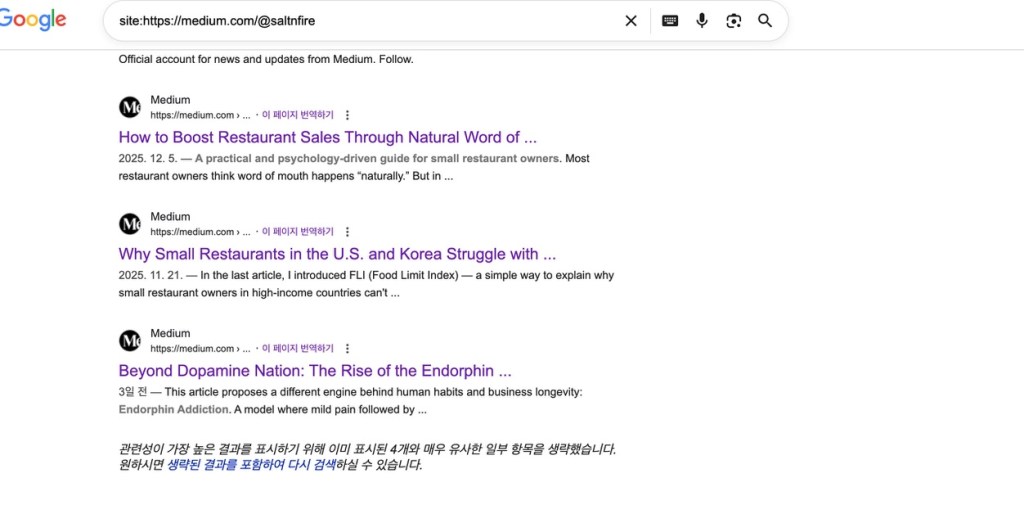
[Photo: Even though I’ve properly configured my canonical settings on Medium, my Medium account is being indexed instead of saltnfire.net.]
Why? Because Medium’s domain authority is far higher than personal blogs. So I made a brutal decision: I deleted my Medium account entirely. Similar problems can happen on Shopify. For example, when one product generates multiple pages through: collections, color variations, size options. If canonical is not handled correctly, Google may treat all of them as duplicate low-quality pages. Then even new products may never appear in search results.
- You can spread flyers everywhere, but always mark the original address.
- For new sites, it is safer to cross-post to Medium or Substack only after stable traffic is established.
Cause #3: Reporting Matters
After you change site structure, you must: delete the old sitemap, and submit the new sitemap to Google and Bing. Many people forget this step. If you do not update your sitemap, search bots keep crawling the old, broken structure. New sites already have: small crawl budgets, and long revisit intervals. With outdated sitemaps, your site looks permanently low-quality to Google. Domain trust drops even further, and new content never appears. For new products or new posts, manual indexing requests are essential.
Whenever you change: robots.txt, noindex rules, sitemap structure. Always resubmit your sitemap immediately.
Cause #4: Check Out Page Loading Performance
WordPress installs many plugins by default. If you do not optimize performance, Google bots may spend most of their crawl budget reading: effects, animations, tracking scripts, instead of your actual content. Access your domain in Incognito mode. Open Chrome, go to More Tools > Developer Tools, and then click “Analyze page load.” Ideally, your page load test score should be above 90. A score in this range indicates that your website is lightweight and well-optimized. Keeping the website lightweight is essential, especially to satisfy the ‘Core Web Vitals’—the key metrics that Google prioritizes as crucial criteria for top search visibility.

[Photo: my page loading score]
(3) Internal and External Linking Strategy
Now let’s move from technical cleanup to positioning. The next question is: “How do I convince search engines that this site is an expert on something?”
The answer is: link structure.
Internal Links: Building Content Clusters
To be recognized as an authority, your pages must connect tightly. From Google’s perspective: If pages about tents, lanterns, and sleeping bags are linked together, this looks like a camping specialty store. That is content clustering.
If you link: high-traffic pages to low-traffic or new pages , you can boost rankings. But careless, excessive internal linking hurts user experience. Dwell time is the most important index. Too much internal link can increase bounce rates. So internal links should follow real context:
- product explanations
- related photos
- relevant articles
Internal linking is not just an SEO trick. It is how you give users a reason to stay inside your site. That is why I link articles with similar themes and logic.
External Links: Backlinks with Meaning
When traffic comes from high-authority domains like: Reddit, Medium, Twitter (X). Google increases your credibility. This is what people call backlinks. But buying backlinks in bulk is dangerous. Most paid link networks: have no real users, or hurt domain trust after short-term effects. Organic references are slow, but safer.
In fact, according to accounts from South Korean sole proprietors, it is not uncommon to hear that once the “adrenaline shot” of artificial traffic is cut off, their search rankings drop even further than before, and their indexed pages are entirely wiped out.
Note: When I was running my store, I didn’t do any advertising at all. Yet, thanks to Google’s targeted exposure, Slovakians kept coming back. Based on that experience, I’ve philosophically considered why you shouldn’t purchase external traffic.
(4) Traffic Diversification is Good Only If You Have Enough Resources
Google changes its algorithm thousands of times per year. Depending on one traffic source is dangerous. So Many people advise against relying on a single platform like Google or YouTube, instead recommending an OSMU (One Source Multi-Use) strategy.
However, when I used AI assistance to manage multiple channels simultaneously—including podcasts, X, LinkedIn, Medium, YouTube Shorts, and WordPress—I found that the energy required for actual creation was severely depleted. Furthermore, no platform seemed to welcome the practice of dipping a toe into every channel just to embed URLs that drive traffic back to one’s original website. They essentially want users to stay within their own walled gardens rather than siphoning away traffic. In this regard, Google, as a search engine, seems to be the fairest. Whether it is an apparel online store or a knowledge-retailing blog, it appears far better to plant deep roots in a single platform and take a decisive stand there.
Furthermore, when AI-generated summaries, images, or videos are scattered across various platforms, people tend to instantly dismiss them as “AI slop,” regardless of what you are actually selling. This deals a severe blow to your brand image. Ultimately, such proliferation is far less effective than a single, meticulously crafted piece of original text or imagery.
5. Conclusion
In this article, I focused on one practical truth:
Modern craftsmen must understand platform distribution structures.
Everything here is based on what I personally experienced online. We covered:
- Platform-based stores vs. independent websites → pros, cons, and who benefits from each
- What to watch out for when running independent sites (WordPress, Shopify, etc.)
- How domains get labeled as low-quality by Google and how to avoid it
- How to diversify traffic using AI tools
Even if you outsource website management, it helps to understand the basic logic of how these systems work. Endorphin craftsmanship does not assume “one big lucky breakthrough.” It is a strategy of: understanding structure, spreading risk, and building systems that become stronger over time. I hope this article helps small business owners and creators develop their instincts for distribution and survival.
If there are major changes in SEO behavior, I will continue updating this article.

If you enjoyed this article, you can support the project – thank you!